
Last updated on
Oct 31, 2026
Get the free Bank Deposit and Withdrawal Slips
We are not affiliated with any brand or entity on this form

Fill out
Complete the form online in a simple drag-and-drop editor.

eSign
Add your legally binding signature or send the form for signing.

Share
Share the form via a link, letting anyone fill it out from any device.

Export
Download, print, email, or move the form to your cloud storage.
Why pdfFiller is the best tool for your documents and forms


End-to-end document management
From editing and signing to collaboration and tracking, pdfFiller has everything you need to get your documents done quickly and efficiently.
Accessible from anywhere
pdfFiller is fully cloud-based. This means you can edit, sign, and share documents from anywhere using your computer, smartphone, or tablet.
Secure and compliant
pdfFiller lets you securely manage documents following global laws like ESIGN, CCPA, and GDPR. It's also HIPAA and SOC 2 compliant.
What is Deposit Withdrawal Slips
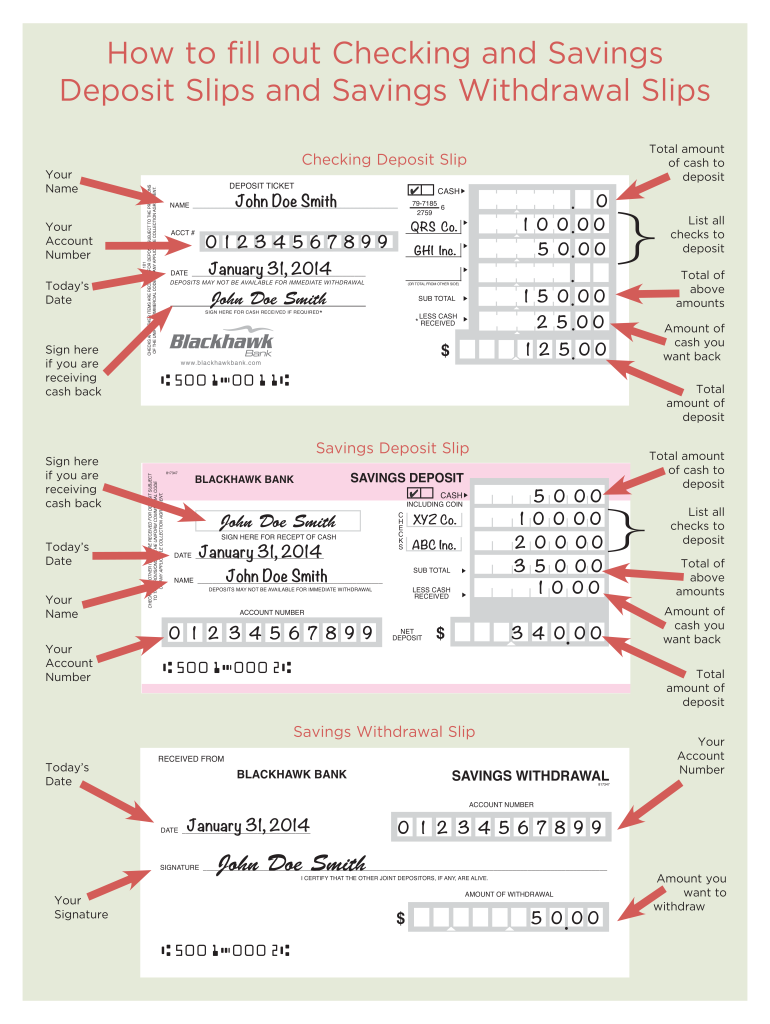
The Bank Deposit and Withdrawal Slips is a type of document used by customers to facilitate financial transactions at Blackhawk Bank, specifically for deposits and withdrawals.
pdfFiller scores top ratings on review platforms




The program is user friendly. Easy to operate!
VERY MUCH GOOD FOR JOB I have already several year in mi computer. They just need to be able to turn the shape vertical for horizontal
Who needs Deposit Withdrawal Slips?
Explore how professionals across industries use pdfFiller.

Deposit Withdrawal Slips is needed by:
-
Blackhawk Bank customers needing to deposit funds
-
Account holders making withdrawals
-
Businesses managing daily cash transactions
-
Financial professionals handling client funds
-
Individuals needing to track deposits and withdrawals
-
Students or parents managing school savings accounts
Comprehensive Guide to Deposit Withdrawal Slips
What is the Bank Deposit and Withdrawal Slip?
The bank deposit and withdrawal slip is a vital document used at Blackhawk Bank for facilitating deposits and withdrawals. This form plays a crucial role in financial transactions by ensuring accuracy and accountability. It allows users to provide necessary details including their name, account number, and the amount being transacted, thus providing a structured approach to handling funds.
Recognizing the significance of both the bank deposit slip template and the savings withdrawal slip can enhance one's banking experience. Understanding how to correctly utilize this form can make processes smoother and more reliable.
Purpose and Benefits of Using the Bank Deposit and Withdrawal Slip
Using the bank deposit and withdrawal slip offers several advantages that improve banking efficiency. Primarily, it streamlines the overall banking procedures for deposits and withdrawals, reducing the likelihood of errors during transactions. Simplified processes can save time and enhance customer satisfaction.
Moreover, this form helps maintain accurate financial records, ensuring that users can track their transactions effortlessly. By utilizing financial transaction forms like these, customers not only expedite their banking tasks but also secure their financial history.
Key Features of the Bank Deposit and Withdrawal Slip
This document contains essential sections that are critical for completing any transaction. Key features include the fields for name, account number, amount, and a signature line. These components ensure that all necessary information is captured concisely.
Additionally, the slip includes instructions in both English and Spanish, making it accessible to a broader audience. Users will appreciate the clarity that comes from having detailed instructions available in multiple languages.
Who Needs to Use the Bank Deposit and Withdrawal Slip?
This form is essential for a diverse group of individuals. Business owners, employees, and individual account holders are all required to complete and submit this slip when conducting bank transactions.
Understanding the role of the depositor is vital, as the deposit slip needs to be signed for validation. By targeting these users, Blackhawk Bank ensures that its services cater to a wide range of consumers.
How to Fill Out the Bank Deposit and Withdrawal Slip Online (Step-by-Step)
To complete the bank deposit and withdrawal slip online, follow these step-by-step instructions:
-
Begin by entering your name in the designated field.
-
Fill in the current date of the transaction.
-
Enter the amount being deposited or withdrawn.
-
Provide your account information, including the account number.
-
Review all entered details for accuracy before final submission.
Each field plays a critical role in ensuring the transaction is processed smoothly, making familiarity with bank deposit instructions beneficial.
Common Errors When Completing the Bank Deposit and Withdrawal Slip
To maximize the effectiveness of the bank deposit and withdrawal slip, users should avoid common errors. Frequent mistakes include failing to sign the slip, entering incorrect amounts, or leaving out essential information.
Here are some tips for reviewing the form before submission:
-
Ensure your name, date, and account number are correctly filled out.
-
Double-check the amount to be deposited or withdrawn.
By addressing these common errors, users can prevent delays and complications with their transactions.
How to Sign the Bank Deposit and Withdrawal Slip
Signing the bank deposit and withdrawal slip is a crucial step in the validation process. A signature serves as a verification method to ensure that the document is authentic.
Users have the option to employ either digital signatures or traditional wet signatures, depending on their preference. Understanding the implications and requirements of each signing method can enhance the transaction's security.
How to Download, Save, and Print the Bank Deposit and Withdrawal Slip
For users looking to manage their banking documents efficiently, here are practical steps to download, save, and print the bank deposit and withdrawal slip:
-
Select the option to download the slip as a PDF document.
-
Save the file on your device for easy access.
-
Open the saved file and use the print function to obtain a physical copy for submission.
This process facilitates users in maintaining their financial organization and providing necessary documentation to Blackhawk Bank.
Where to Submit the Bank Deposit and Withdrawal Slip
Once completed, the bank deposit and withdrawal slip can be submitted through various accepted methods. Users can choose to submit their slips in person at a Blackhawk Bank branch, online through the bank's website, or by mailing the paperwork directly.
Be aware of any state-specific regulations that could influence submission processes, ensuring compliance with local banking requirements.
Secure Your Transactions with pdfFiller
Utilizing pdfFiller for managing your bank deposit and withdrawal slip can enhance your document handling experience. pdfFiller provides a secure platform that is user-friendly and supports features such as eSignature capabilities, ensuring your sensitive information remains protected.
With robust security measures in place, pdfFiller helps streamline the form filling process, making it a smart choice for handling financial transaction forms effectively.
How to fill out the Deposit Withdrawal Slips
-
1.Begin by accessing the Bank Deposit and Withdrawal Slips template on pdfFiller's website. Search for the document in the template library, or follow any provided link to access it directly.
-
2.Once the form is opened, navigate through the template to locate fields designated for user input such as 'Name,' 'Account Number,' and 'Amount.'
-
3.Before filling out the form, gather the necessary information, including your bank account details and the deposit or withdrawal amounts you intend to input.
-
4.Start filling in your details in the respective fields using pdfFiller’s fillable format. To add text, click within the blank spaces and begin typing.
-
5.Pay attention to the signature field; you'll need to sign the form by using pdfFiller's e-signature options to authenticate your transaction.
-
6.As you fill in the form, ensure that all information is accurate, avoiding common mistakes such as typos in your account number or incorrect amounts.
-
7.After completing all necessary fields, review the entire form carefully for accuracy and completeness before finalizing it.
-
8.Once satisfied, proceed to save your form. Use the save function on pdfFiller to retain a copy of the filled form for your records.
-
9.You can now download the filled form or submit it according to your bank's procedures. Follow any additional instructions if provided on the form or by your bank.

Who can use the Bank Deposit and Withdrawal Slips?
Any customer of Blackhawk Bank can use the Bank Deposit and Withdrawal Slips to facilitate their financial transactions, including both personal and business account holders.
What information is required to fill out the form?
Users need to provide their name, account number, and the amount for deposit or withdrawal, and must also sign the form to validate the transaction.
Is there a deadline for submitting the form?
While there is no specific deadline for the form itself, it's essential to submit deposits and withdrawals during banking hours to ensure transactions are processed on the same business day.
Can I submit the form electronically?
Yes, you can complete the form electronically using pdfFiller and submit it as per your bank's specified submission procedures, often via online banking or direct delivery to a bank branch.
What common mistakes should I avoid when filling out the form?
Ensure all details are accurately entered, particularly your account number and amounts. Avoid leaving any required fields blank, as it may delay processing.
How can I get a copy of my completed form?
After filling the form on pdfFiller, utilize the save function to download a copy for your records. You can also email the completed form directly if you're submitting electronically.
What happens if my form is filled out incorrectly?
If filled incorrectly, the form may be rejected or result in processing delays. It's crucial to double-check all entered information for accuracy before submission.
Related Forms







Related Catalogs
Get the latest insights from our blog


If you believe that this page should be taken down, please follow our DMCA take down process
here
.
This form may include fields for payment information. Data entered in these fields is not covered by PCI DSS compliance.